OFFICIAL DOWNLOADS

Download and install OpenClaw HelpermacOS · Linux · Windows

Two installation methods: download the native desktop app installer, or use a one-line script for server mode (browser access, no GUI needed).

License
Need a license key? Please email me at laputancnai@gmail.com
NVIDIA GUIDE

Need an NVIDIA API key first?

If you want to use NVIDIA free models, we prepared a beginner-friendly illustrated guide that shows exactly how to register, verify your email, and generate an API key.

Read the NVIDIA API Key guide

macOS

Native-feeling DMG downloads for both Intel and Apple Silicon Macs.

macOS 11 Big Sur+
Install notes
  1. Choose the correct build for Intel or Apple Silicon.
  2. Open the `.dmg` and drag OpenClaw Helper into Applications.
  3. If Gatekeeper blocks first launch, allow it in System Settings → Privacy & Security.
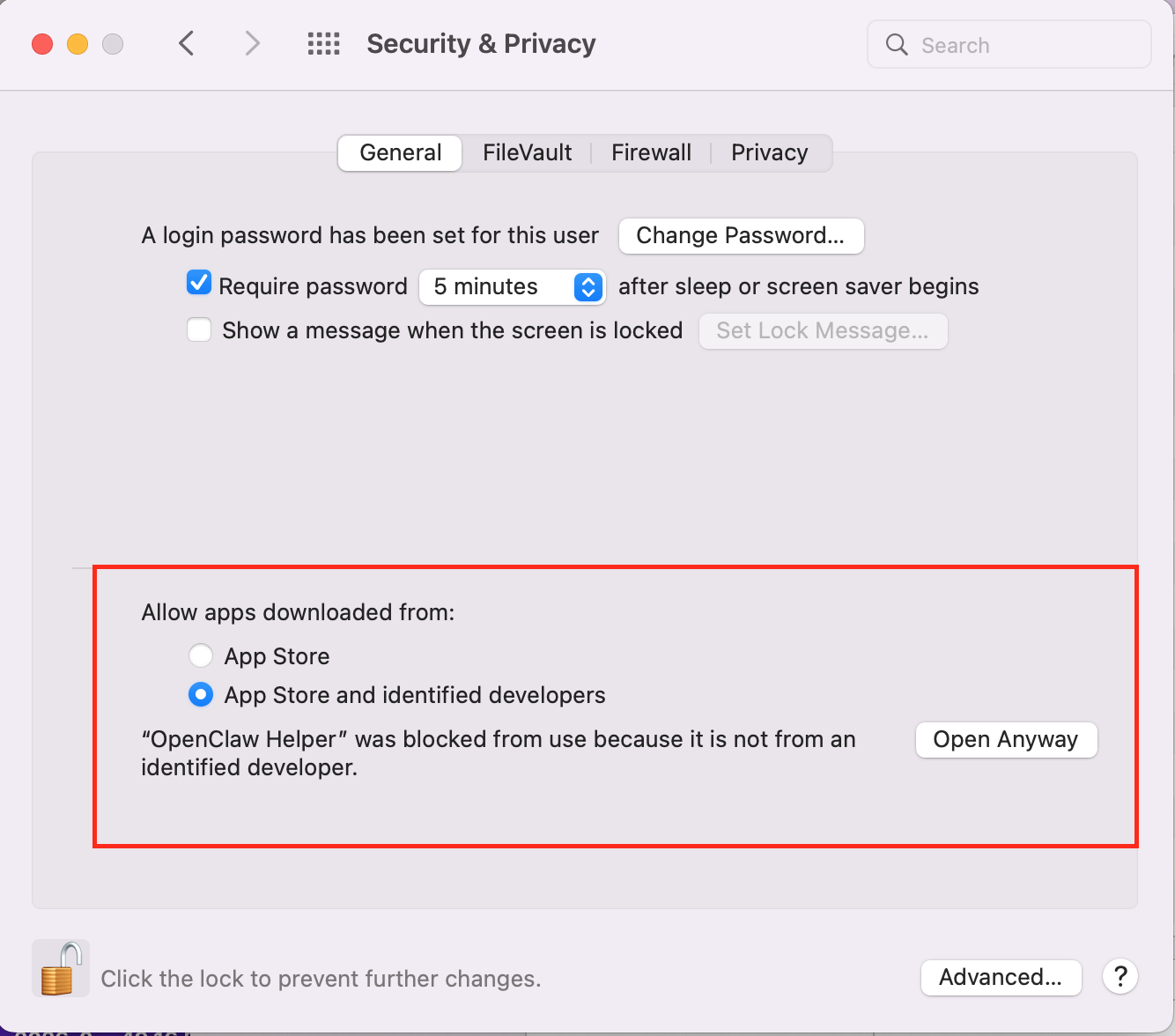
Screenshot of macOS Privacy & Security settings
Alternative: one-line CLI install (server mode)

If the installer doesn't work on your system, use this one-line script instead. It installs the server edition — no GUI required, access it through your browser.

macOS (Terminal):
curl -fsSL https://raw.githubusercontent.com/laputancnai-png/openclaw-helper-releases/main/install.sh | sh
After install:
  1. Run openclaw-helper in Terminal (if not found, add ~/.local/bin to your PATH)
  2. Open http://127.0.0.1:3131 in your browser
Checksums & release notes

For production or enterprise distribution, verify the SHA256 files together with the installer.
Linux

Official AppImage for Ubuntu and most desktop Linux distributions.

Ubuntu 22.04+ / Debian 12+ / Fedora 37+ · GLIBC 2.35+
Download installer (desktop app)
Install notes
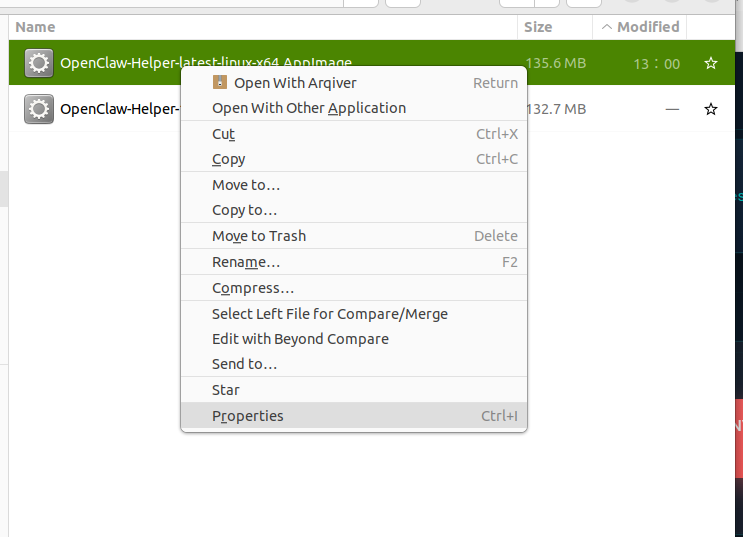
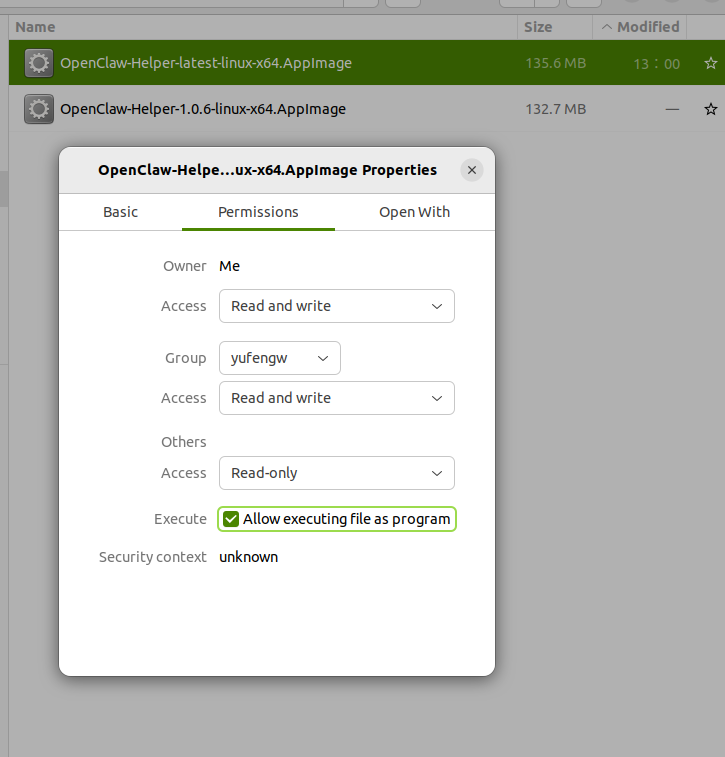
  1. After downloading the `.AppImage`, grant execute permission once.
  2. Then double-click it or run it from terminal.
  3. If your desktop blocks execution, allow it in file properties first.
Linux install step 1 screenshot 1Linux install step 1 screenshot 2
Alternative: one-line CLI install (server mode)

If the installer doesn't work on your system, use this one-line script instead. It installs the server edition — no GUI required, access it through your browser.

Linux (Terminal):
curl -fsSL https://raw.githubusercontent.com/laputancnai-png/openclaw-helper-releases/main/install.sh | sh
After install:
  1. Run openclaw-helper in Terminal (if not found, add ~/.local/bin to your PATH)
  2. Open http://127.0.0.1:3131 in your browser
Checksums & release notes

For production or enterprise distribution, verify the SHA256 files together with the installer.
Windows

Windows x64 installer for most Windows 10/11 users.

Windows 10 (1803)+
Download installer (desktop app)
Install notes
  1. Double-click the `.exe` installer after download completes.
  2. If Windows SmartScreen appears, click "More info" → "Run anyway".
  3. Launch OpenClaw Helper from the Start menu after installation.
Alternative: one-line CLI install (server mode)

If the installer doesn't work on your system, use this one-line script instead. It installs the server edition — no GUI required, access it through your browser.

Windows (PowerShell):
irm https://raw.githubusercontent.com/laputancnai-png/openclaw-helper-releases/main/install.ps1 | iex
After install:
  1. Double-click 'OpenClaw Helper (Server)' on your Desktop, or run openclaw-helper.bat
  2. Open http://127.0.0.1:3131 in your browser
Checksums & release notes

For production or enterprise distribution, verify the SHA256 files together with the installer.